See what any Shopify store runs on. Know when competitors move.
A Chrome extension for store owners and dropshippers: theme, apps, bestsellers, suppliers and ads in one click, plus alerts when competitors add products, start sales or change prices.
7 days of Pro free after install · No account · No subscription
What you get
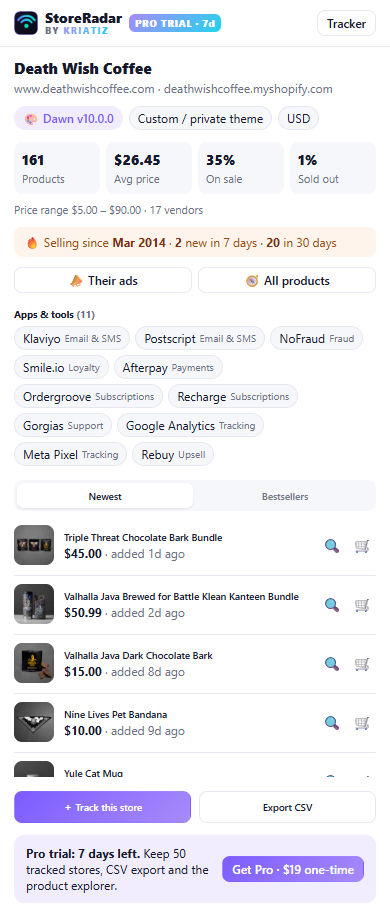
🎨 Store inspector
Theme and version, installed apps and pixels, product count, average price, share on sale and sold out.
🔥 Store activity
Selling since when, and how many products were added in the last 7 and 30 days.
🏆 Bestsellers & newest
The store's own best-selling ranking and its latest launches, with prices and discounts.
🔍 Find the supplier
Reverse-image search any product with Google Lens or search it on AliExpress in one click.
📣 Their ads
Open the store's active ads in Meta Ad Library.
📡 Competitor tracking
Alerts for new products, sales, price drops and rises, sold-outs and restocks. Tiny rounding changes are filtered out.
🧭 Product explorer
Every product of a store in one table: sort by newest, price, discount or bestseller rank.
📄 CSV export
Shopify import format or an analysis sheet with one row per product.
🔒 Private
No account, no tracking. Everything stays in your browser. Only public store data is read.
Pricing
Free
- Store inspector on any Shopify store
- Bestsellers, newest products, activity
- Supplier search and ad links
- Track 2 competitor stores
- Product explorer preview (20 rows)
Pro LAUNCH PRICE
- Everything in Free
- Track up to 50 competitor stores
- Full product explorer
- CSV export
- All 1.x updates included
14-day money-back guarantee. Price includes VAT/sales tax where applicable.
How Pro works
1. Install the free extension. Every install starts with a 7-day Pro trial.
2. Buy Pro. After payment you're taken to a page with your license key, and it's also on your receipt page.
3. In the extension open Tracker → Pro & settings, paste the key and click Activate.